 laisha
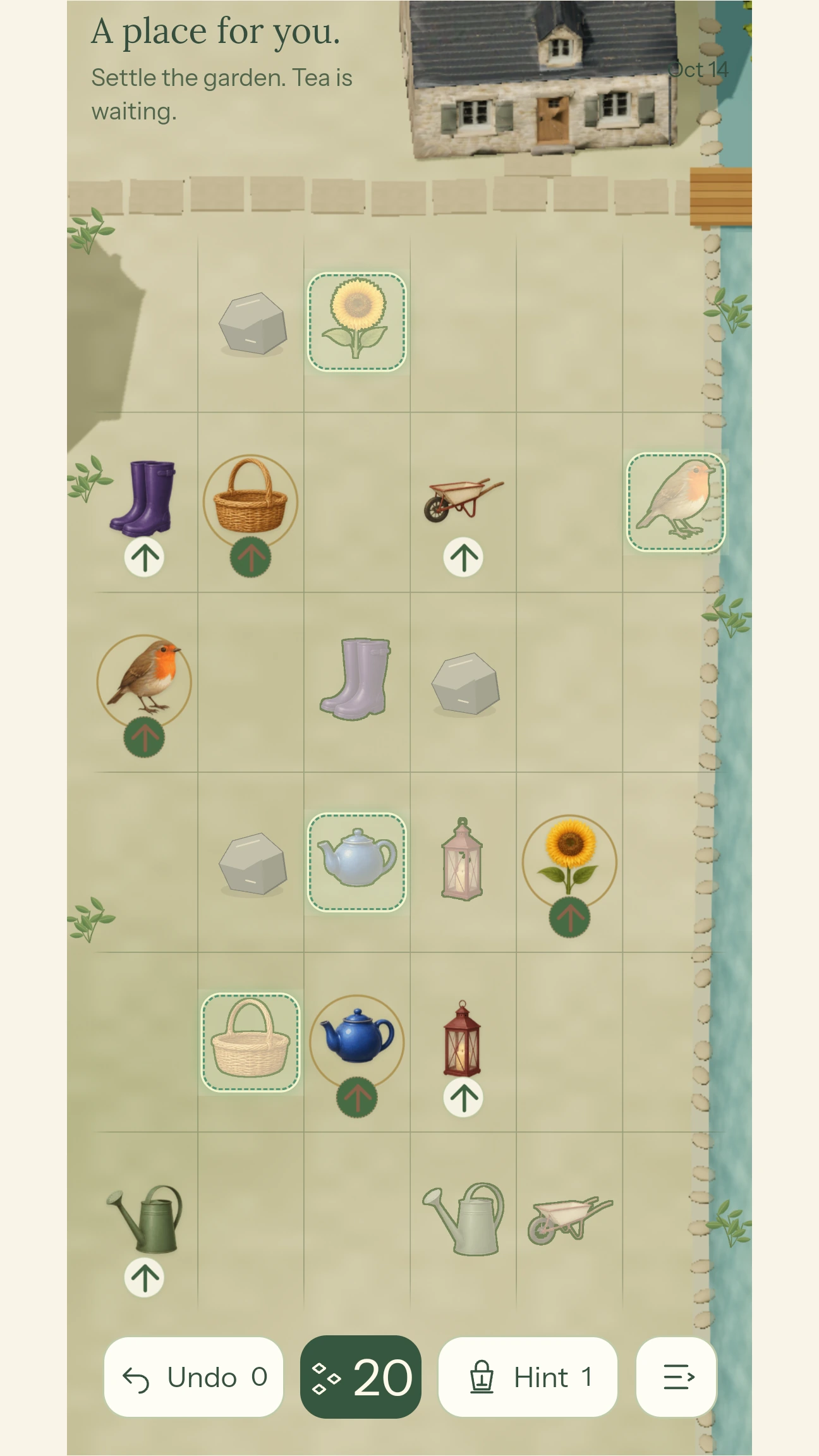
One direction. A group of your choosing.
Choose Start playing from the courtyard to enter the daily puzzle. The solid objects are your pieces; the faded matching shapes are their destinations. Undo, the remaining moves, Hint and the menu sit below the board.
Tap or click one or more pieces to select them. Move the group one square in the direction shown by the arrow. Every selected piece moves together, and the whole move uses one move from the round's budget.
On a phone, swipe across the board in the arrow's direction. With a mouse, drag in that direction. You can also use the matching arrow key. Tap a selected piece again to remove it from the group, or press Escape to clear your selection.
Reaching a place turns the arrow.
Each piece has its own matching destination. When it reaches that destination, it settles there and the shared direction turns 90 degrees clockwise. A settled piece stays put.
The turn happens once for each newly settled piece. If two pieces arrive in the same move, the direction turns twice. You choose which pieces travel together and when each one finishes.
Make room before you finish.
Pieces cannot leave the board, cross a fixed obstacle, or enter another piece's matching destination. A piece can move into a square another selected piece is leaving, because the group moves together.
If any selected piece cannot make the move, the group stays where it is and no move is spent. An arrived piece can block a route, so check what the remaining pieces will need before you settle it.
- Look at both the next square and the direction after an arrival.
- Select several pieces when moving them together saves a move.
- Use Move preview from the menu to see the next positions before committing.
A whole puzzle in three moves.
This small board is the practice puzzle from the game’s tutorial. Letters stand in for the courtyard objects: each filled piece belongs in the dashed place with the same letter.
A starts at the top left; B starts below it. Their matching places are at the top right and bottom right. The arrow points right, and you have three moves.
A and B move into the middle column together. This spends one move for the group. Neither has arrived yet, so the arrow still points right. Two moves remain.
A reaches its matching place and settles. B moves to the square above its own place. A’s arrival turns the shared arrow clockwise, from right to down. One move remains.
A is settled and stays put. Move B down into the bottom-right place to finish. Both pieces have arrived in three group moves.
Why move them together?
If you move A right twice on its own, it settles while B is still in the left column. The arrow then points down. The one remaining move cannot take B across to its place on the right. Moving the group prepares B for the direction you will have after A arrives.
Try this board in the game: open the menu, choose How to play, then Try it yourself. The practice board has its own state and does not spend moves or help from your daily challenge.
Ready for another idea? See two worked strategy examples about moving through a vacated square and planning two arrivals in one move.
Two rounds to return to each day.
Complete the first round to continue automatically into the second. The daily challenge changes at midnight UTC. The game tells you when a new challenge is ready so that yesterday's board does not silently become today's.
The opening introduces the courtyard and its story. Choose Start playing to enter the puzzle. You can return to the story and find the tutorial, music and other settings in the menu.
Each round has a limited move budget. Taking a moment to plan can save a move: the group you choose and the order of arrivals matter more than how quickly you swipe. The first round leads into a second challenge with its own board and budget.
You can restart an unfinished round. Once completed, a daily round is locked; after both rounds, return for the next UTC day. For extra practice without changing today’s result, use the tutorial or work through the strategy guide. The same browser and device keep your local preferences and session; the browser and Android app do not offer a shared account sign-in.
Optional ads for extra help.
Browser ads are not enabled yet. The flow below describes the optional ads planned for the browser game after approval. Optional rewarded ads are enabled in Android v2.0; availability depends on your region, privacy choices and ad supply.
Undo takes back an accepted move. Hint offers guidance for your current position. Free help is claimed by sharing first; see the daily sharing allowances. When that allowance for a tool is used up, an ad can offer one more use.
- Open Undo or Hint. If an ad is available, the offer states the reward before you watch: one extra use of the selected tool for the current attempt.
- Choose whether to watch. Select Watch ad · +1 Undo or Watch ad · +1 Hint to begin. You can close the offer before watching and keep playing. Starting a puzzle or moving a piece does not start an ad.
- Return to the puzzle and use your help. The puzzle pauses while the ad is playing. After you complete the ad and its result is confirmed, one extra use is added. Choose Use Undo or Use Hint to apply it.
Each attempt can earn up to two extra uses from ads in total, shared between Undo and Hint. An unavailable or unfinished ad adds no help. Watching an ad is optional; you can continue solving the puzzle without it.
Ads belong inside the game at ta.jxdc.win and in the Android app. The company, guide and support pages on jxdc.win do not display ads. See ad availability and the advertising privacy information.
Release notes from the courtyard.
· Install the browser game
The welcome screen now offers a way to install Tide Archive for easier return visits. You can dismiss the card, choose not to see it again, or find Install Tide Archive in the game menu while playing in a browser. Supported browsers open their installation prompt; others show instructions. Installation is optional, and you can keep playing in the browser.
Normal play also avoids accidental text selection, image dragging and long-press copy menus on the game surface. Name fields still support editing and copying. This change applies to the browser game.
· Android courtyard download
The Android 2.0.0 build 6 APK became available from this website, with the courtyard pieces and their matching destinations. Free Undo and Hint help in this version is claimed through the Android share panel. Opening the panel successfully claims the help, even if you cancel afterward; the app does not publish on your behalf. See help and sharing for the daily limits.
· A continuous courtyard
The opening story and puzzle began sharing the same courtyard, with the cottage, tea table, stream and stone path carrying through into play. Completing the first daily round takes you straight into the second.
The board and controls use at least four fifths of the screen’s height, with brighter Undo and Hint controls. Submenus include a way back to the main menu, and the game links directly to its support and privacy pages.
When an update is available in an older browser tab, use Install available update from the menu. This loads a newer game version; it is separate from adding the game to your home screen.
Take the courtyard with you.
Install Tide Archive from Google Play, or download the APK directly from this site. Store availability depends on your region and release access.
Android 7.0+ · Version 2.0.0 (build 6) · 24.2 MiB
Internet connection required at launch and for online help. The direct APK can start without Google Play installed.
Installing the APK
- Download the APK to your Android device and open the file.
- If Android asks, allow Install unknown apps for the browser or file manager opening this download.
- Choose Install. For an existing Tide Archive installation, keep the app installed and accept the update. You can turn off that install permission afterward.
If Android refuses an update, see Android support before uninstalling.
Download details and SHA-256
The APK uses the same app signature as the Google Play version. File: tide-archive-2.0.0-6.apk (25,418,837 bytes).
SHA-256: 3325b59d036bdc74f26239d626f3ad9188270c69896b1766aad523b66784b3b8